
instructionsInstructions for submitting sample data online
Online sample data submission is an essential step—eDNA analysis may be delayed if physical samples are received at our labs without metadata being submitted prior.
The instructions on this page refer to submitting sample data ready for eDNA analysis using our online sample data submission form This process ties your physical samples to your contact information via their UID (Unique Identifier / kit number) present on every Wilderlab sampling kit. The UID number is either five digits (6-replicate kits) or six digits (single replicate kits) and can be found on the back of your sample bag, as shown below.
Examples of filled out sample data on the back of the kit bag of a single replicate sample (pictured left) and a 6-rep kit (pictured right). The red boxes indicate the UID (kit number), which you will need to enter into the online sample submission form (see table below) or the spreadsheet templates.

For small jobs choose manual input and complete steps 1 to 5. For larger jobs or pre-extracted DNA, click the button on the right and follow the instructions at the bottom of this page.
Manual input submission for smaller jobs

Note that saving your form input is not possible. If your browser times out or is closed data will be lost. Use our Excel templates to avoid data loss. See below.
1 Contact section
Firstly, complete the contact fields of the online form, including a name, email and an optional job reference. Select which country you are sending your samples from. This is important as it helps our team to give you the right information in accordance with different import regulations. A form will be emailed to the address provided as part of the process along with any additional instructions. Please follow the instructions in this email carefully to ensure your samples are not held up at customs.
2 Analysis section
Next, you should specify which type of eDNA analysis is required for your samples. If the samples/kits do not have prepaid eDNA analysis included, you will be directed to enter your billing information for the cost of analysis (section 4). Submitting your samples online also reserves a place for them in our laboratory workflow, so we're ready to process them when they arrive. You should also make selections about data sharing of your results.
3 Samples section
In the online sample manifest table, fill out the information for each one of your samples. This includes all the details you noted down on the back of your sample kit bag. The additional information you included beyond the UID number is for your own records, and can be useful for when you are later interpreting and reporting on your results. The inclusion of your sampling location coordinates in WGS84 format allows your sample to be explored as a point on our online eDNA map either behind password protection or publicly visible depending on your choice. We encourage you to make your data publicly available and contribute to a valuable global biodiversity resource.
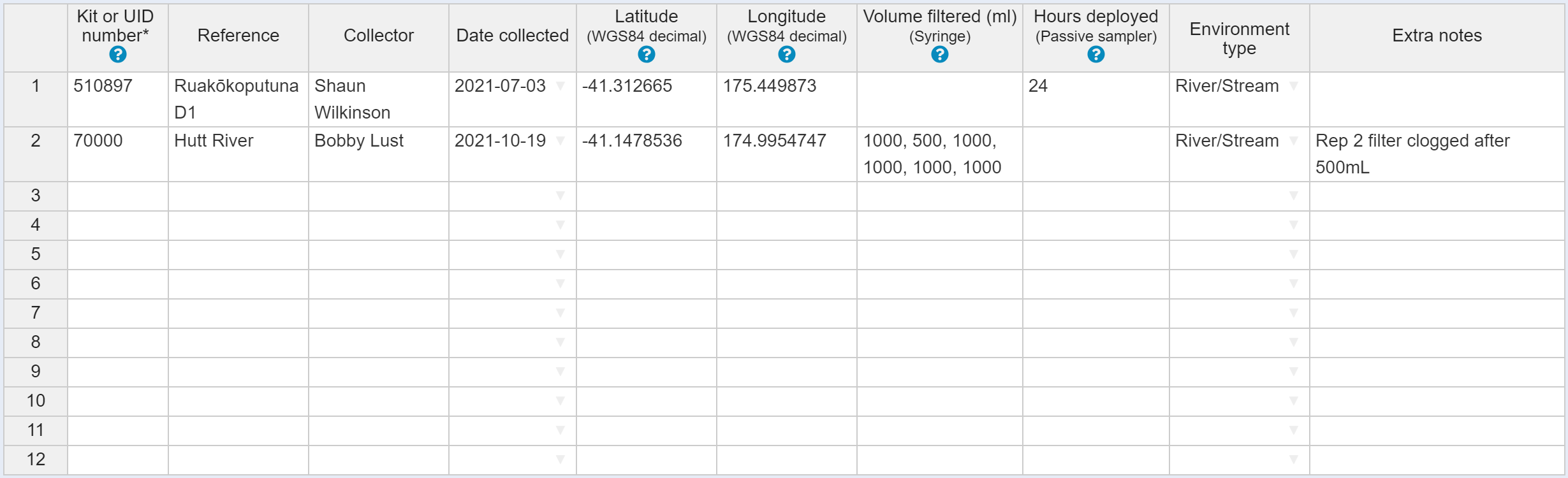
Above, each UID/kit is input into a row of the manual online manifest table, using the example kit data shown previously.
4 Billing section
If any of the UID you entered have no associated pre-paid eDNA analysis, then in the billing section complete the contact billing information for the recipient of a quote for this cost. The currency (USD, NZD, AUD or GBP) can be selected. Your account number and a purchase order number are optional fields. Section 4 is skipped if all UIDs are pre-paid.

5 Review section
Check all data presented at the review step. Review and acknowledge agreement with Wilderlab’s Terms and Conditions and then click Submit to finish the process. Take note of the Job Number when successful submission occurs. The job number can be used when contacting us about your samples, and to locate results when exploring our global map of eDNA species data. An email will be sent with further instructions.
Upload Excel template for large jobs or pre-extracted DNA
An alternative to manually filling out the sample manifest table form is to upload a file with the required information using our spreadsheet templates. To do this using the submit sample form, first select ‘Upload Excel spreadsheet’. Then download the relevant template (standard or pre-extracted DNA), fill out your information in the tabs of the spreadsheet, save it, and finally upload it back into the online sample submission tool.
If you need it now, download the standard sample template here.
After downloading the XLS template, do not change the spreadsheet column headers. These must match the template otherwise the upload will not be successful.
Now that you have reviewed the instructions you are ready for Online sample metadata submission.
Learn more about shipping your physical samples or pre-extracted DNA to our labs.